Got a $30 Best Buy brand 65w laptop charger. Apparently, I didn’t take into account, that the dock needed power, so have only been using the AC adapter the Deck came with.
Steam Deck is also faster when plugged in. Not surprising.
Not sure exactly how I got 4k 60hz working. The new AC adapter probably helped.
Did turn crap off for 30 seconds or so too.
Made a script to add the resolution using kscreen-doctor:
#!/usr/bin/bash
sleep 5
WAYLAND_DISPLAY=wayland-0 kscreen-doctor output.DP-1.addCustomMode.3840.2160.59980.reduced
sleep 5
WAYLAND_DISPLAY=wayland-0 kscreen-doctor output.DP-1.mode.3840x2160@60
sleep 5
brew services restart sunshine-beta
Don’t know why it doesn’t detect it. Might need to mess with settings on TV too. Somebody said they don’t get full color, I do.
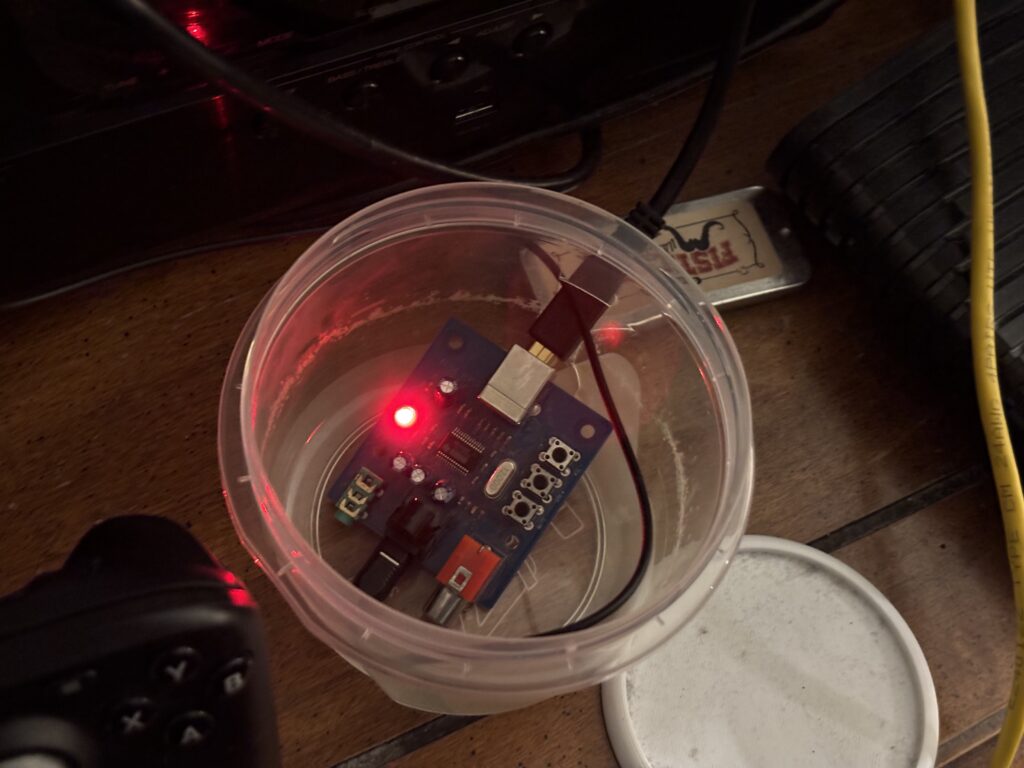
My fancy PCM2704 board still works too, bought in 2014.
Optical is better then HDMI. TV can be off now. Didn’t want to change KDE settings to keep TV on. Also, with the Atari VCS, HDMI could have some kind of annoying delay or lag sometimes.
Could sound slightly better too.
I was going to use analog, but don’t think I can assign that to the game input.
There’s this, if I ever want something better. But I have my own nice case, Tupperware. Had to use a steak knife, then scissors to make the hole. Would have been easier to just not have the lid completely closed.
Less likely to shock it, with it in there.
Where can the Hifime S2 Digi be bought in the US? The link above is a cheaper one, that can be shipped from US. But the Hifime S2 Digi does 192 kHz.
Need to get a hi res song, and see if it has any difference.
I put Bazzite on the Deck too. Don’t like SteamOS.
The on screen keyboard worked in the installer. Might need to click certain buttons to make it show. It just showed up in the installer.
Have to map it to something it looks like.
Mapped it to y.
Don’t plan on playing games @ 4k. Just needed it to do 4k 60hz, so it would be better then Atari VCS. Atari VCS can do 4k 60hz.
Still can’t play Just Cause 3 on it, for some reason. Works on desktop for some reason. Or did last time I opened it. I can stream it though.
#!/usr/bin/bash
sleep 5
QT_QPA_PLATFORM=wayland kscreen-doctor output.DP-1.addCustomMode.3840.2160.60000.reduced
sleep 5
QT_QPA_PLATFORM=wayland kscreen-doctor output.DP-1.mode.3840x2160@30
sleep 5
QT_QPA_PLATFORM=wayland kscreen-doctor output.DP-1.mode.3840x2160@60
sleep 5
QT_QPA_PLATFORM=wayland kscreen-doctor output.DP-1.scale.2.44167
sleep 5
brew services restart sunshine-beta
Better script, changing directly to 60Hz doesn’t work for some reason.
And turning the TV on, you might be greeted by a black screen. Moving the joysticks on game controller doesn’t wake it up either.
Well, TV woke up today. Sleep is disabled. But set to turn monitor off after 60 minutes.