7Artisans 12mm f/2.8 Mark II Lens for Micro Four Thirds

Is 3 or infinity sharper? I’m going with 3.

Might be a review about that. Maybe 3 is infinity. Fine with me.

Also, the screen on my camera, isn’t very helpful for judging sharpness. Take a photo, and zoom in on it, and not helpful.

The magnifier might help more, when taking the photo.

But my monitor is even better.

OLYMPUS DIGITAL CAMERA

What is that in the sky? Maybe the UV filter. Was pointing it directly at the sky. And the sun was brighter earlier.

At least the sky wasn’t all white like most of the other photos.

Using Aperture Priority mode now, too lazy to manually change shutter. Also, it’s too easy to get a bad photo, if using EVF and selecting the shutter speed myself.

Maybe the auto brightness makes the EVF too bright, changed it to 4. There’s a live composite mode too, that might help.

Don’t use a lens profile for a f5.6 in RawTherapee on a f8 or so image.

Doing so, messes the image up, and clicking reset on auto leveling doesn’t fix it apparently.

Some images, might not be able to make the sky blue, without replacing the entire sky color. Too lazy to do that. At least the trees are green now.

A ND filter might be nice. Can attach one to the UV filter too.

Won’t order one from B&H though, only get free fast shipping over $49 or something. Won’t spend that much on a ND filter either.

The smaller bag is way smaller, and the camera has to be laying flat in it, with extra batteries on top of it, to zip it up. Probably should have got one size up.

The 7.5mm lens might be a little shorter.
HDMI Emulator useless

No idea if it was actually working in Bazzite or not.

Tried removing the encryption over SSH, and had to install something else. Garuda Linux doesn’t work very well. So ended up with openSUSE Tumbleweed. SSH failing to start, pissed me off.

I might have done something on my laptop to fix that.

The dock I got does 4k@60Hz anyways.

Just needed to disable the Steam Deck screen, adding video=eDP-1:d to the bootloader.

Otherwise, turning receiver and TV off, turns the Deck’s screen on, not what I want.

Tried editing EDIDs and it just gets an error -2 trying to load it.

The emulator might do 4k@60Hz, if you use limited color, and maybe 8 bit. But I couldn’t get it to work, so I gave up finally.

New dock and a EDID emulator for Steam Deck

This wavlink dock, works just fine, even my wireless keyboard. No more lag with keyboard.

May have gotten ripped off on the EVanlak EDID emulator, the one that does 4k 60Hz.

It shipped from Amazon. If it’s cheaper to buy on Amazon, then I should have sent my mom some money. I don’t have prime, nor will I pay for it.

No idea if this dock needs that or not, to do 4k 60Hz. Might as well use the emulator, since I bought it.

Says I have a Mi TV or something.

Turning receiver off and back on, and it still has a signal.

Not sure how I didn’t have to pay tariffs on the dock either. They shipped it using 4px.com. But the listing claims they ship from the US. Do people shipping from/to the US, use 4px.com? Doesn’t seem likely.

CachyOS LTS kernel not recommended

Installed that in Garuda Linux, and didn’t take long to get a AMDGPU bug.

And then after going back to linux-lts-61, it wouldn’t mount my network shares on boot anymore.

And then I changed something, and regenerated the initramfs, and just got a nice black screen. SSH wouldn’t work either. Probably cause it was still “booting up”.

Had to use a snapshot, then I restored the snapshot, after fixing polkit again.

Does installing that with Garuda Toolbox, install something else? No idea, how installing that kernel, and then going back to the other kernel, would break my network shares.

That’s the only nice thing about btrfs, is snapshots.

But then you have to delete snapshots, or computer will slow to a crawl.

Desktop is most likely using ext4, for that reason. I have my own backups.

openSUSE is more stable anyways.

The CachyOS kernel, can make my laptop seem faster. But I don’t like AMDGPU bugs.

That’s why I’m using 6.1.170-1-lts61, it might be more stable. Need to open Moonlight and see.

Guild Wars 2 works on laptop

Didn’t crash right after entering the game like last time.

It wanted to verify the files. Not sure why it wanted to do so again though. Maybe every time I open it, it will want to.

Probably won’t platy it anyways. Just wanted to see if it wouldn’t crash. Or freeze my laptop.

Over 100 FPS @ 4k, on low settings. The eGPU I have won’t do 4k on high settings, nor will my desktop.

Well, now it won’t open apparently. Says “Running” but I see nothing.

Got it to open, and it didn’t want to verify the files again.

Garuda Linux, not a lazy person’s Arch Linux

Wondering why Garuda Toolbox no longer works? Well, it shows the password dialog for a second, then closed.

The solution can be found here.

Have to keep fixing Garuda Linux apparently.

Well, maybe I shouldn’t use any Arch based distros then. Unless there’s one, that you don’t have to keep fixing.

openSUSE doesn’t need much fixing, unless you use btrfs, then it slows to a crawl after a while.

Can’t update it though, if you want hardware acceleration with Sunshine. Have to wait a long time.

There’s some issue with Slow Roll.

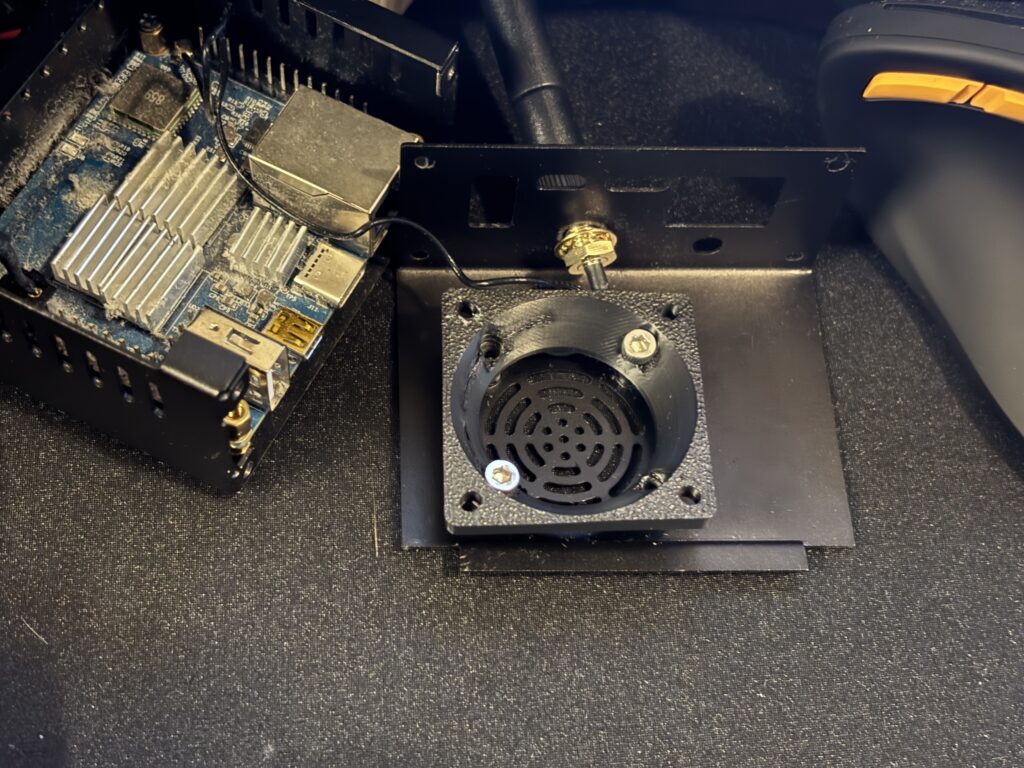
30mm to 40mm fan adapter, not very useful

Need a nut to secure the fan. Well, my fingers are too fat.

Also, probably not enough room in the Orange Pi Zero 2 case. The Noctua fan has long thick cables. And that adapter, makes it even taller.

I’ll look for a new case now.

I bought that 3D printed adapter. Only one screw would stay in for the 40mm part. So maybe the holes aren’t threaded correctly. Didn’t test one hole.

Think I blew the dust out of the case too.

The fan was probably making noise, cause of a cable.

Might be hard to find a case for it. Don’t have a 3D printer.

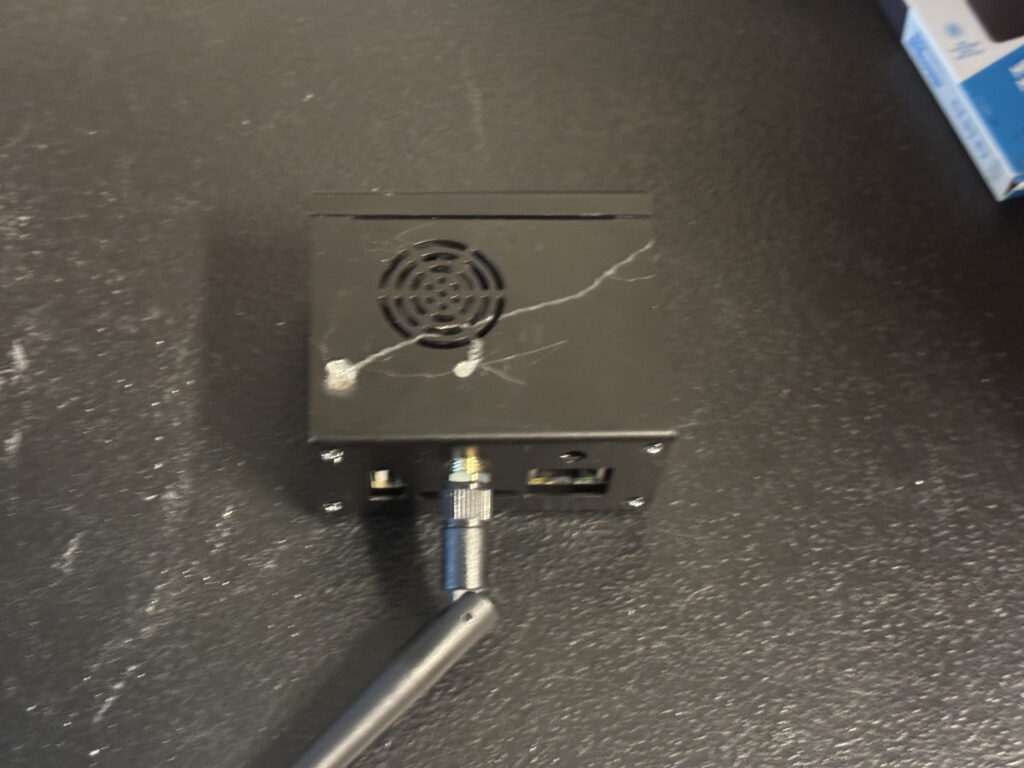
Well, cheaper to mod the case. Need a drill or something. Put the fan on the outside. And put the cables through a hole on the outside as well.

Now to lookup prices of a drill.

$79 for a Kobalt. Better then Walmart’s brand. But probably overkill.

My crappy Walmart rotary tool, might be able to do it. And might have come with two drill bits. Just have to get it at my mom’s house.

That’s free. Unless I need to buy a bit.

Rotary tool useless. Lucky I didn’t hurt my thumb as well.

New fan is slightly more messed up as well. Messed it up trying to screw it onto the adapter yesterday.

And another feature of the iPhone, is shitty image stabilization. How about the “smart” phone uses the flash? Also, if it takes too long to take the photo, I’ll be moving.

Don’t have any issues with my micro four thirds cameras. I use a flash inside though.

Also, too lazy to force the flash on, as it’s a “smart” phone, should figure it out itself.

Would be cheaper to pay to get a case printed, but might be a waste of money, if the print has one or more issues. Borrowing a drill might be cheap.

Is a drill easier to use then a rotary tool?

There’s a manual way to punch a hole in metal. I have a hammer. Just need the other thing. That might be the “safest” way. But might be too weak to do that.

Oh wait, not that safe. I have fat fingers and thumbs.

Podman WordPress

Put three WordPress sites in a Pod using Podman. I use the Simply Static plugin, then upload it using rsync.

wp.pod:

[Pod]
#HostName=WordPress
Network=pasta:--map-gw,-a,10.89.0.1,-g,10.89.0.1,-n,24
#IP=10.89.0.1
#Network=host
#Network=wp-bridge.network
#UserNS=keep-id
UIDMap=+33:0:1
ShmSize=4g
[Service]
Restart=always

[Install]
WantedBy=default.target

wpdb.container:

[Container]
AutoUpdate=registry
Image=docker.io/mariadb:latest
Environment=TZ=America/Los_Angeles
Pod=wp.pod
#HostName=wpdb
#Network=wp-bridge.network
#IP=10.89.0.13
#PublishPort=33067:3306
Network=pasta:-t,3306,--map-gw,-a,10.89.0.13,-g,10.89.0.1,-n,24
User=1000
Group=1000
Volume=/media/nas/Local Sites/mysql:/var/lib/mysql
Environment=MARIADB_ROOT_PASSWORD=root
[Service]
Restart=always

[Install]
WantedBy=default.target

adminer.container:

[Container]
AutoUpdate=registry
Image=docker.io/adminer:latest
Environment=TZ=America/Los_Angeles
PublishPort=8383:8080
Pod=wp.pod
#Network=wp-bridge.network
#IP=10.89.0.14
Network=pasta:--map-gw,-a,10.89.0.14,-g,10.89.0.1,-n,24
#User=1000
#Group=1000
Environment=MARIADB_ROOT_PASSWORD=root
[Service]
Restart=always

[Install]
WantedBy=default.target

site.container:

[Container]
AutoUpdate=registry
Image=docker.io/wordpress:latest
Environment=TZ=America/Los_Angeles
PublishPort=8982:80
Pod=wp.pod
#Network=wp-bridge.network
Network=pasta:--map-gw,-a,10.89.0.15,-g,10.89.0.1,-n,24
#IP=10.89.0.15
User=0
Group=0
Volume=/path/to/wp-site:/var/www/html
Environment=WORDPRESS_DB_HOST=10.89.0.13
Environment=WORDPRESS_DB_USER=root
Environment=WORDPRESS_DB_PASSWORD=root
Environment=WORDPRESS_DB_NAME=sacredboobs
[Service]
Restart=always

[Install]
WantedBy=default.target

Faster then LocalWP as well.

Librewolf is fixed

Deleted everything in .librewolf, now it works fine.

May 02 10:48:19 laptop kernel: amdgpu 0000:0a:00.0: amdgpu: SMU: response:0xFFFFFFFF for index:18 param:0x00000005 message:TransferTableSmu2Dram?
May 02 10:48:19 laptop kernel: amdgpu 0000:0a:00.0: amdgpu: device lost from bus!
May 02 10:48:19 laptop kernel: amdgpu 0000:0a:00.0: amdgpu: Failed to export SMU metrics table!

That’s why the screen was going black.

Added pci=nommconf pcie_aspm=off to /etc/default/grub.

Using all-ways-egpu as well now.

Hasn’t went black yet, was doing it pretty quickly as well.

Couldn’t find any refresh profile button on about:support. I guess Librewolf removed that.

I knew it was a Librewolf problem, because FireDragon has no issues. One problem with FireDragon, when first starting it, it goes to some donate page for some extension. Best to remove that.

Dark Reader is preinstalled, and wants money. Now to see if FireDragon can use Firefox Sync too.

It passed the crapper test. Just took a dump. And it’s still working.

And FireDragon Firefox Sync doesn’t work. Logged in, but doesn’t actually sync anything. Clicked sync more then once as well.

Garuda Linux works on laptop

I’d recommend Xfce or KDE Lite though.

Damn scrolling on their site is slow again. Thought it was fixed, after changing CPU governor.

Most of the effects are disabled, and restoring my /home folder from openSUSE made it even better looking. I don’t see how all those effects will help anybody play a game.

The remove bloatware link on their Wiki is a 404 error as well.

Also, disable the file search in KDE.

One more site to migrate to Podman. LocalWP is annoying. Can’t use it on more then one computer.

And scrolling on their site is fast again. Just tried changing to the performance governor, and said it couldn’t. Then changed it back.

Also, disabled the power core performance CPU crap on my laptop. Over 90C, after logging in, seemed high to me. It’s 44C right now.

Maybe that’s why it was freezing in the past.

Also, don’t use FreeSync with AMD, it’ll crash apparently. Was testing to see if that would work. Monitor turns off, and a blinking light on laptop. I have the laptop screen disabled.

KWIN_DRM_NO_AMS=1

That might help too.

Either Garuda Linux hates my laptop, or this dock can’t provide enough power. I unplugged the AC adapter laptop came with.

The monitor kept going black.

I’ll see if plugging AC adapter in too, makes any difference, if not I’ll be switching to something else.