Amazfit better then Garmin

Got the Active 2 Round from Amazfit. The Garmin I have, has a shitty screen. Can only set it to be locked all the time, and their app sucks.

Amazfit Active 2 has an off wrist lock setting. Might not always work though. The Nothing watch I was using, has zero lock feature.

Last Apple Watch had a burnt charger cable. Won’t use any watches made by Apple.

Also I like round watches better.

Garmin also came with a short USB cable, and requires fucking with it, to get it to charge, or at least show the icon that it’s charging.

Should have got the Amazfit to begin with. Maybe it doesn’t always lock the screen, cause I use an elastic band. Doesn’t make me sweat. The band it came with did. Guess all those holes on it don’t do anything.

No idea if the Amazfit requires uploading the data to them, to sync it, like Garmin does. Old post on internet said it doesn’t.

Looks like it synced in airplane mode. Not sure why Bluetooth was still on in airplane mode though.

Nice, no more needing to waste data uploading to sync my watch.

A nice iOS feature, can’t connect to WiFi after disabling airplane mode. Rebooting phone, as it’s most likely the phone. Looks like that fixed it.

Another good iOS feature, it has to be rebooted sometimes, as nothing will load.

IEEE 802.11: did not acknowledge authentication response

No I won’t change settings so the iPhone can connect easier.
OPNsense is working finally

Ditched pfSense, cause there wasn’t a security update for unbound for the CE version. No idea if there is yet or not.

Well, OPNsense made my network faster anyways. Ended up passing through the network card. Did I try that with pfSense? No idea.

Couldn’t ping my Atari VCS on WiFi, using the non WireGuard IP. I was right though, it’s a WireGuard issue.

Use this AllowedIPs calculator. Enter “0.0.0.0/0” for allowed, and then enter all the IPs you want to be able to access it, not using WireGuard.

Just mess up the WireGuard config on it, then ping the non WireGuard IP, and it works.

Make sure you add the IP of the device with WireGuard on it.

I’m not paying for security updates. Even though, security doesn’t exist. But no, I don’t trust Comcast’s DHCP servers.

steamdeck kwin_wayland[2182]: atomic commit failed: Permission denied

That’s likely why KDE crashes on Steam Deck, when turning the monitor off.

I set KWIN_DRM_NO_AMS=1 to try and fix it. Have that on laptop too, and KWIN_DRM_NO_DIRECT_SCANOUT=1, which seems to have fixed AMDGPU from crashing on laptop.

The Deck was completely frozen or something this morning as well. Could ping it, but no SSH. And turned TV on, and black screen.


#!/usr/bin/bash
while :
do
    _cmd_systemd=$(systemctl is-system-running | grep -e "initializing" -e "starting" -e "maintenance" -e "stopping" -e "offline" -e "unknown")
    _cmd_pid=$(pidof /usr/bin/kwin_wayland)
    if [ $(cat /sys/class/drm/card1-DP-1/status) == "connected" ] && [ "$_cmd_systemd" == "" ] && [ "$_cmd_pid" == "" ] ;
        then
        echo "restarting lightdm"
        sleep 1
        systemctl stop lightdm
        sleep 1
        systemctl start lightdm
        sleep 10
    fi
    sleep 15
done

Script to restart KDE from udev, if auto login is enabled.

It finally works, without restarting lightdm over and over again. Might be why the Deck is crapping out.

Don’t bother with UDEV. “amdgpu 0000:04:00.0: [drm] Dirty helper failed: ret=-22”. Must have crashed it. Ran systemctl soft-reboot, and it’s working again.

Updated the script, it can be ran from systemd.

If ten seconds is too long of a wait, change it to less, or remove it. Think I’ll increase it by 5, just in case. LightDM has a timeout of 5.

[Unit]
After=systemd-user-sessions.service getty@tty7.service plymouth-quit.service lightdm.service

[Service]
ExecStart=/opt/restart_plasma.sh

[Install]
WantedBy=multi-user.target

It’s still crashing, even with disabling AMS.

PipeWire slow to restart

Just trying to get netjack2 to work. I rebooted it, got sick of waiting for it to restart pipewire.

It works. Just don’t test the audio in KDE Settings. That doesn’t work. But sending audio from SDR++ works.

Goodbye Garuda Linux on Atari VCS

All I did was disable LightDM. Apparently there isn’t getty enabled.

Well, I broke it, by installing r8168-dkms. Was trying to fix the Ethernet issues. I was trying to share the WiFi connection with an Apple TV. No official WireGuard app for the Apple TV, and I’m not buying an app either.

Also, better to put it 100% behind a VPN.

I just installed Debian on the USB drive, using a virtual machine. Does the Atari VCS use UEFI? I think it supports it.

An update could have messed it up as well, or a setting change. Well, Debian should be more stable.

The USB audio adapter on the Steam Deck may have issues now. Music sounds funny with it. Too lazy to change any settings. HDMI sounds fine so far.

pfSense IO error in VM

Don’t use the default libvirt directory, it ran out of space.

Restored the backup to the other storage pool, and now it’s working again.

I like my waffles thick

Thick ladies are nice too.

Don’t follow the instructions for a waffle mix. Use more batter then it says. Start with the amount of water it says.

Taste way better.

The best frozen waffles, are the Belgian ones from Trader Joe’s. Too expensive though, only four waffles for $6 or $7.

Only downside is, I got sweaty. Makes more sense though, then sitting by the AC and being sweaty.

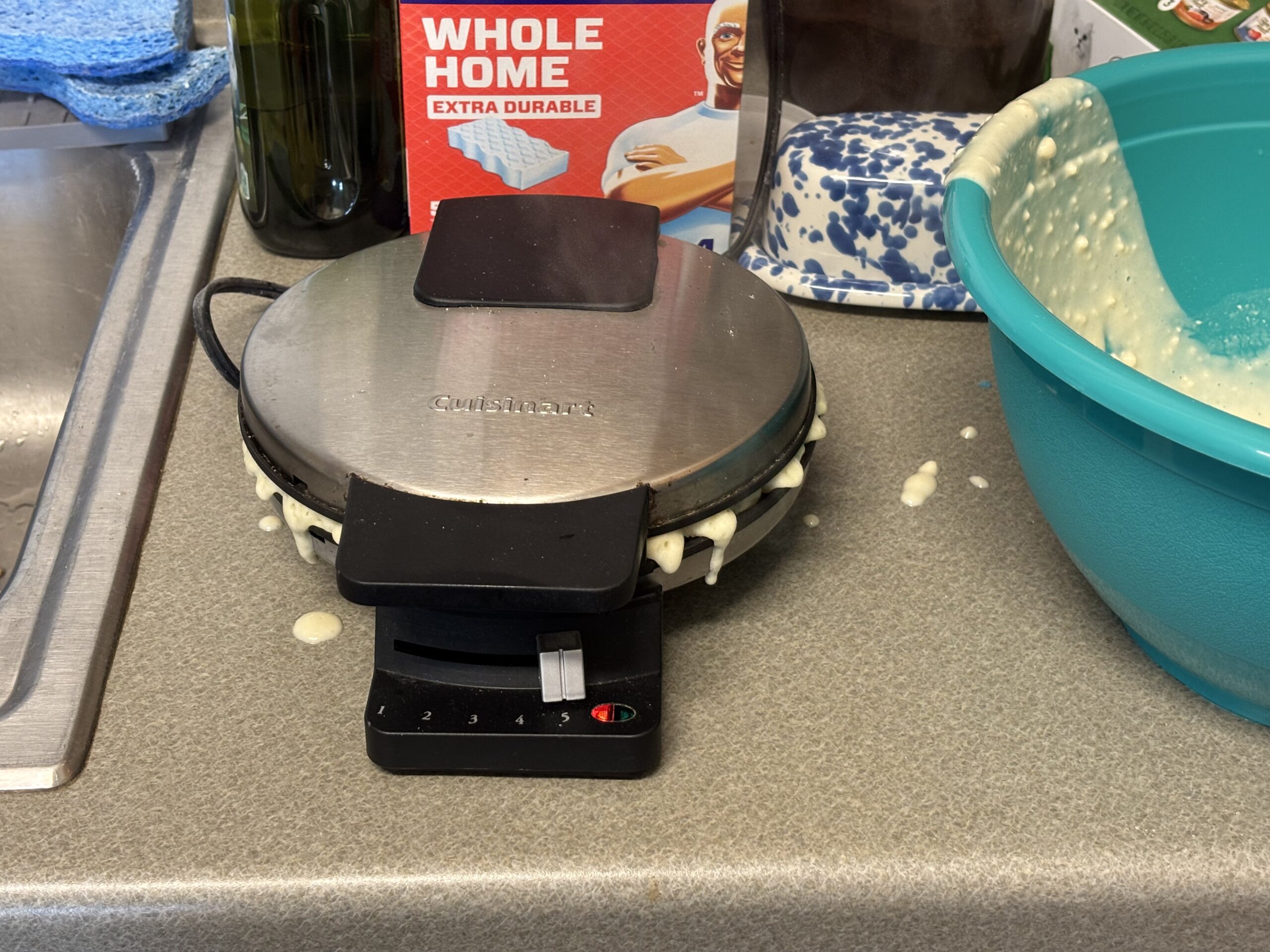
Also made a big mess on the counter. I was just guessing the number to put the waffle cooker on, guess 5 works. Easy to put too much batter on the cooker too.

Don’t put enough, and it won’t be as big of a waffle as it can make. Well, the waffles go in my stomach, and out my asshole, so I don’t care what it looks like.

I moved that box, after I realized the waffle cooker is hot. One waffle came apart when opening it, probably opened it too soon. But it was better then the first waffle.

No idea how many waffles I made, didn’t bother counting. Put em in the freezer.

Does Costco sell a giant box of waffle mix?

A 10 pound bag of waffle mix. But says an egg is needed for waffles. Not much point in buying eggs, just for waffles.

Put oil on the waffle cooker, haven’t used it for a long time. Got oil on the counter too, that’s why the waffle cooker was sliding around when trying to clean around it.

I’m guessing my spray bottle I put oil in, is from Walmart. Cause it sucks. Doesn’t seem to “spray”, a bunch comes out though.

AQUA CREST water filters not recommended

Water doesn’t taste filtered anymore.

And I have diarrhea, might not be related though, no idea.

I think it says they can be returned on Amazon, they can have the used one back too, cause it doesn’t filter anything.

Water comes out too fast. Now to fill up my ZeroWater filter.

Well, ZeroWater pitcher is useless. There’s some kind of water stains on the lid. And removed the sprout, and one part of the sprout, has something on it. Too lazy to try cleaning whatever it is off of it.

Do glass pitchers get a white powder stuff on it? I doubt ZeroWater makes a glass one.

SELinux is preventing acpid from using the dac_override capability.

Well, I’ve had enough SELinux on my Deck. Switching it to AppArmor.

I guess SELinux is broken in openSUSE on my Deck.

The easiest way to fix SELinux, would be reinstalling. But might not work because I’m using getty to auto login. No display-manager.

Well, maybe KDE will be more stable.

Nice, I was able to login to Cockpit, without fucking with anything.

zypper rm “selinux*”, no point in leaving it installed. Maybe I should switch my desktop to it too. SELinux isn’t worth the trouble.

[drm] *ERROR* [CRTC:86:crtc-0] flip_done timed out

AMDGPU crashed yet again on my laptop. Downgraded the kernel. Did the firmware update too? If so, I should downgrade that too. KDE may have updated, and perhaps it’s triggering the AMDGPU bug more now.

I think somebody said using Cosmic fixed it for them.

Perhaps I should downgrade MESA. Well, then I need to upgrade the other stuff.

Should install Cosmic on the Deck though, maybe it’s more stable then KDE on the Deck. MESA updated on the 21st. The kernel and firmware the 23rd.

Desktop hasn’t crashed yet, but don’t use it much. Somebody said, that’s hard to reproduce, well using LibreWolf in KDE, has been working for me to reproduce it.

And no amdgpu.dcdebugmask=0x12 didn’t fix anything.

Won’t use Cosmic on laptop. Too much work to figure out how to use the eGPU for everything. Well, if the monitor is plugged into eGPU, then it’ll seem slow, if it’s using the iGPU.

And the AI is a liar, said to use cosmic-comp to start without a display manager. Now it shows a gray screen.

If I use start-cosmic, it takes a very long time.

Good idea, put username in default_session for cosmic-greeter, instead of whatever Github said to do. That’s what Gentoo said to do. Didn’t work, trying that command without a display manager. But forgot to change getty@tty1.service.